Microsoft has issued Security Updates (SUs) to address vulnerabilities detected in:
- Exchange Server 2019
- Exchange Server 2016
These SUs are tailored for specific versions of Exchange Server:
The March 2024 SUs tackle vulnerabilities reported responsibly to Microsoft by security partners and identified through internal processes. While there are no known active exploits in the wild, it is strongly advised to promptly install these updates to safeguard your environment.
These vulnerabilities pertain to Exchange Server; however, Exchange Online customers are already shielded from them by the addressed SUs and thus require no further action apart from updating any Exchange servers or Exchange Management tools workstations in their setup.
For more detailed information on specific Common Vulnerabilities and Exposures (CVEs), refer to the Security Update Guide (filter on Exchange Server under Product Family).
Upon installing this security update, Exchange Server discontinues the use of Oracle Outside In Technology (also referred to as OutsideInModule or OIT). This technology executes text extraction operations during the processing of email messages with attachments in Exchange Transport Rule (ETR) and Data Loss Prevention (DLP) scenarios.
For more information, see The OutsideInModule module is disabled after installing the March 2024 SU.
For detailed guidelines on update installation:
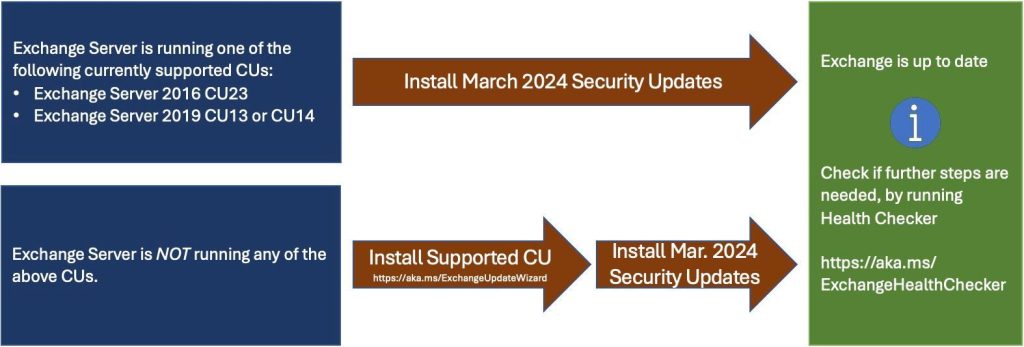
- Opt for the latest CU using the Exchange Update Wizard, selecting your current CU and target CU for instructions.
- Assess your Exchange Servers’ inventory to ascertain required updates with the Exchange Server Health Checker script.
- Re-run the Health Checker post-SU installation to identify any further necessary actions.
- In case of installation or post-installation errors, utilize the SetupAssist script for troubleshooting. For unresolved issues after updates, consult the Repair failed installations of Exchange Cumulative and Security updates.
Known issues with this release:
- Download domains not working after installing the March 2024 SU
- OwaDeepTestProbe and EacBackEndLogonProbe fail after installing March 2024 SU
FAQs:
- Our organization operates in Hybrid mode with Exchange Online. Are there any necessary steps for us? While Exchange Online is safeguarded, this SU must be installed on your Exchange servers, even if solely utilized for management purposes. After SU installation, it’s advisable to rerun the Hybrid Configuration Wizard if there are any changes to the authentication certificate.
- Our last installed SU dates back a few months. Do we need to install all SUs to apply the latest one? SUs are cumulative. If your CU is supported by the SU, there’s no need to install all previous SUs sequentially; simply apply the latest SU. Further information is available in this blog post.
- Do we need to install SUs on all Exchange Servers within our organization? What about ‘Management Tools only’ machines? It’s recommended to install SUs on all Exchange Servers and servers/workstations running Exchange Management Tools to ensure compatibility between management tools clients and servers. For updating Exchange Management Tools in environments without active Exchange servers, refer to this guide.