
Close Menu
ElMajdal.netElMajdal.net
    ElMajdal.netElMajdal.net
    Contact Us
    • Home
    • Windows
      • Windows 11
      • Windows 10
      • Windows 8
      • Windows 7
    • Servers
      • Windows Server
      • Windows Server 2008
      • Exchange Server
    • MAC OS
    • ISA/TMG
    ElMajdal.netElMajdal.net
    Home»Windows 11»Change Size of Desktop Icons in Windows 11
    Windows 11

    Change Size of Desktop Icons in Windows 11

    2 Mins Read
    WhatsApp Facebook Twitter Telegram Reddit Email
    blank
    Share
    WhatsApp Facebook Twitter Telegram Reddit Email

    Introduction

    This tutorial will show you how to change the size of desktop icons for your account in Windows 11.

    I will show you three ways to change the size of desktop icons for your account in Windows 11.

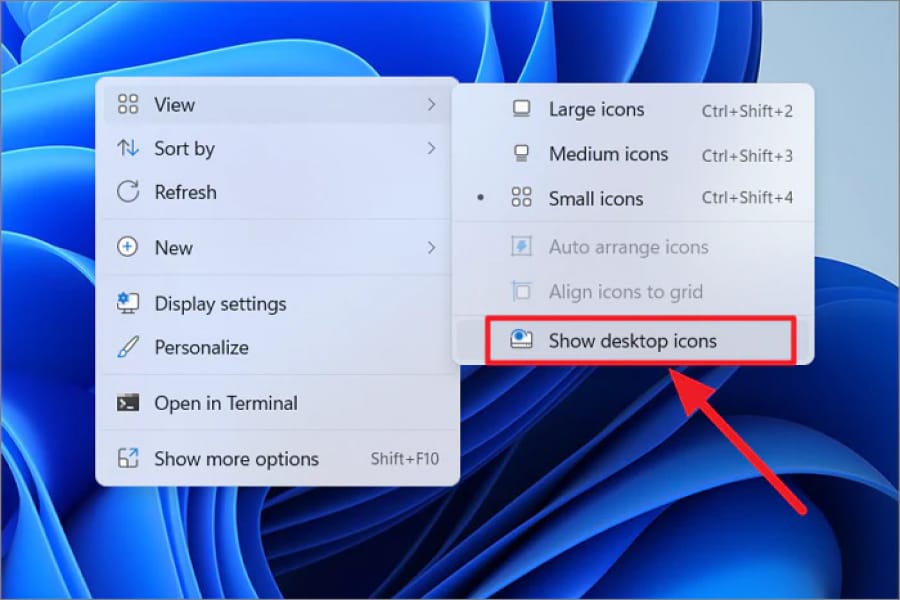
    Change Size of Desktop Icons using Context Menu

    Right click on your desktop, Click on View, and click on Large icons, Medium icons  or Small icons for the size you want

    Change Desktop Icons using Keyboard shortcuts

    Press the keyboard combination in the table below for the desktop icons view size you want :

    Icon Size                  Keyboard Combination
    Extra large icons              Ctrl+ Shift + 1
    Large icons                        Ctrl+ Shift + 2
    Medium icons                   Ctrl+ Shift + 3
    Small icons                        Ctrl+ Shift + 4

    Change Size of Desktop Icons using Scroll Wheel

    Click on your desktop

    Press and hold the Ctrl key while rolling the scroll wheel up (larger) or down (smaller) to cycle the icon view to the size you want, and release the Ctrl key when done.

    Share. WhatsApp Facebook Twitter Telegram Reddit Email
    Previous ArticleGeneric Product Keys to Install or Upgrade Windows 11 Editions
    Next Article Open Folder in New or Same Window in Windows 11

    Related Article

    How To Check The Health Of Your Laptop’s Battery In Windows

    How to Show Hidden Files and Folders in Windows 11

    How To Set Up Fingerprint In Windows 11

    Latest Posts

    How To Enable Active Directory Recycle Bin On Windows Server

    How To Check The Health Of Your Laptop’s Battery In Windows

    How To Transfer FSMO Roles In Active Directory Using PowerShell

    How To Check Active Directory Forest And Domain Functional Level In Windows Server

    Advertisement

    For any Feedback, click on the Contact Us link

    Quick Links
    • Contact Us
    • Windows 11
    • Windows 8
    • Windows 10
    • Windows 7
    • Windows Server
    • Windows Server 2008
    • Exchange Server
    • macOS
    • ISA Server
    • Privacy Policy
    • Contact Us
    • Windows 11
    • Windows 8
    • Windows 10
    • Windows 7
    • Windows Server
    • Windows Server 2008
    • Exchange Server
    • macOS
    • ISA Server
    • Privacy Policy
    © ElMajdal 2007-2026

    Type above and press Enter to search. Press Esc to cancel.