Close Menu
ElMajdal.netElMajdal.net
    ElMajdal.netElMajdal.net
    Contact Us
    • Home
    • Windows
      • Windows 11
      • Windows 10
      • Windows 8
      • Windows 7
    • Servers
      • Windows Server
      • Windows Server 2008
      • Exchange Server
    • MAC OS
    • ISA/TMG
    ElMajdal.netElMajdal.net
    Home»ISA Server»ISA Firewall Quick Tip : Uninstalling MSDE From ISA Server 2006
    ISA Server

    ISA Firewall Quick Tip : Uninstalling MSDE From ISA Server 2006

    2 Mins Read
    WhatsApp Facebook Twitter Telegram Reddit Email
    blank
    Share
    WhatsApp Facebook Twitter Telegram Reddit Email

    Introduction


    Microsoft SQL Desktop Engine (MSDE) installs along with ISA Server 2006. Later on, you might find yourself not requiring to log to the local MSDE. You can change the default logging option from MSDE to another storage format , such as to File Format, MS Access database, or maybe to a Local / Remote SQL Server 2005. In this article I will walk with you step by step showing you how to uninstall MSDE from your ISA Server 2006 machine.

    The following steps shows you how to uninstall MSDE from your ISA Server machine

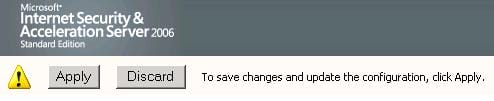
    1. Once the new logging format is set, click on Apply
    2.Now we are ready to uninstall MSDE, go to Control Panel and open Add/Remove programs


    3. Select Microsoft ISA Server 2006 then click on the Change/Remove button

    4. The Microsoft ISA Server 2006 Installation Wizard will start, click on Next

    5.  On the Program Maintenance page, Choose Modify and click Next


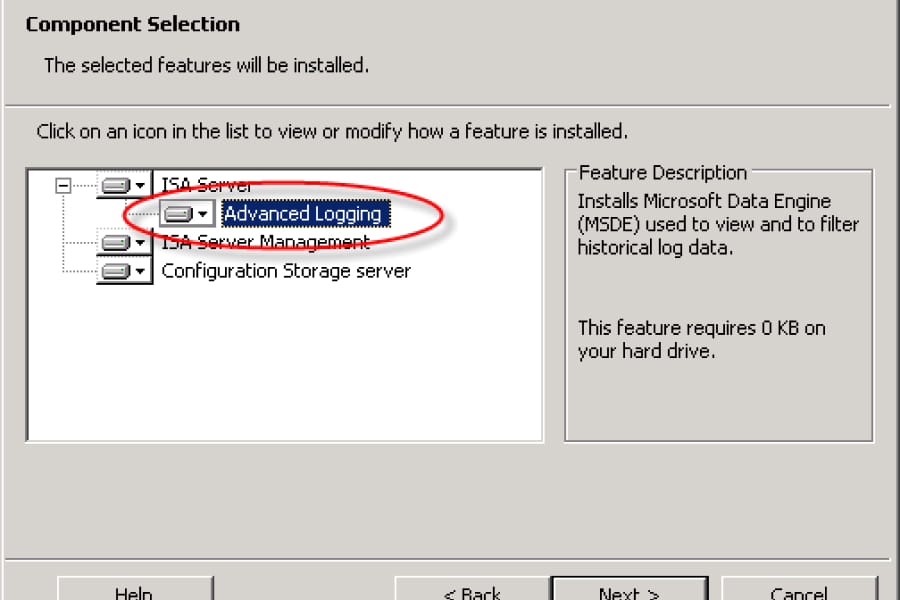
    6. Expand Firewall Services and click Advanced Logging, as you can see on the right side under the Feature Description, this Installs Microsoft SQL Desktop Engine (MSDE)


    7. Click on the Arrow  beside Advanced Logging, and click on This feature will not be available,

    Click Next

    8. On the Ready to Modify the Program page, Click Install   


    9. Once the Install button is clicked, the installation wizard will start uninstalling MSDE.

    Summary

    It is possible to uninstall MSDE from your ISA Server machine, but first make sure that you change its logging type. You might change the logging type from MSDE to File Format, MS Access Database,  or even to a local or remote SQL Server, for example SQL Server 2005


    Share. WhatsApp Facebook Twitter Telegram Reddit Email
    Previous ArticleHow To Turn Off The Automatic Display Of Server Manager At Logon
    Next Article How To Log On To Windows Server 2008

    Related Article

    ISA 2004, ISA 2006 and TMG Server 2010 Version Numbers

    Enabling HTTPS Inspection With Forefront TMG Server 2010

    Search Feature For TMG 2010 Firewall Policies

    Latest Posts

    How To Enable Active Directory Recycle Bin On Windows Server

    How To Check The Health Of Your Laptop’s Battery In Windows

    How To Transfer FSMO Roles In Active Directory Using PowerShell

    How To Check Active Directory Forest And Domain Functional Level In Windows Server

    Advertisement

    For any Feedback, click on the Contact Us link

    Quick Links
    • Contact Us
    • Windows 11
    • Windows 8
    • Windows 10
    • Windows 7
    • Windows Server
    • Windows Server 2008
    • Exchange Server
    • macOS
    • ISA Server
    • Privacy Policy
    • Contact Us
    • Windows 11
    • Windows 8
    • Windows 10
    • Windows 7
    • Windows Server
    • Windows Server 2008
    • Exchange Server
    • macOS
    • ISA Server
    • Privacy Policy
    © ElMajdal 2007-2026

    Type above and press Enter to search. Press Esc to cancel.